
Refrigerator Fan Not Working: How to Fix It
Refrigerator fan not working or making noise? Use this diagnostic flow to identify the cause and fix evaporator or condenser fan problems step by step.
DIY
2/4/20262 min read
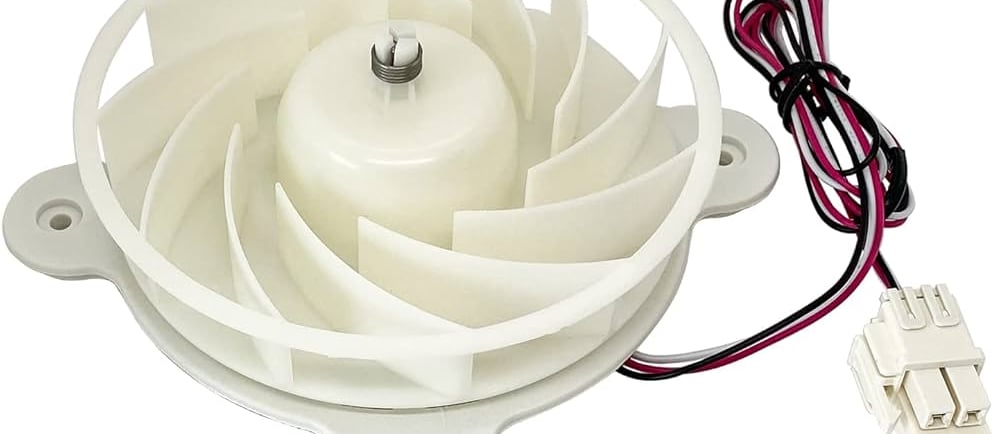
Quick Diagnostic Flow: Which Fan Is the Problem?
Start here to avoid misdiagnosis.
A. Freezer cold, fridge warm? → Likely evaporator fan
B. Fridge warm, compressor hot and loud? → Likely condenser fan
C. No airflow sound at all? → Fan motor, wiring, or control issue
Once you identify the fan, follow the matching checks below.
What Refrigerator Fans Do (Short & Clear)
Evaporator fan moves cold air from the freezer to the refrigerator section
Condenser fan cools the compressor and condenser coils
If either fan stops, cooling performance drops fast.
Tools You May Need
Phillips screwdriver
Flashlight
Multimeter (optional)
Towels
Refrigerator Fan Not Working: Fix Using the Check-and-Confirm Method
Follow the checks in order. Stop when the issue is fixed.
CHECK 1: Power Reset (Do This First)
Why: Control boards can lock a fan after power glitches.
Action
Unplug refrigerator for 10 minutes
Plug back in
Wait 5 minutes for restart
✅ If the fan runs, you’re done.
❌ If not, continue.
CHECK 2: Door Switch Test (Evaporator Fan Only)
The evaporator fan stops when the door is open.
Action
Open fridge door
Press the door switch manually
Result
Fan starts → door switch is faulty
Fan silent → continue troubleshooting
Replace the door switch if confirmed bad.
CHECK 3: Ice or Frost Blocking the Fan
Common after defrost failures.
Inspect
Remove freezer back panel
Look for heavy frost or ice around fan
Fix
Unplug fridge
Manual defrost for 8–12 hours
Restart and monitor
If frost returns quickly, a defrost system issue exists.
CHECK 4: Fan Blade Obstruction Test
Look For
Ice chunks
Packaging debris
Warped fan blades
Spin the blade by hand:
Spins freely → move on
Stiff or blocked → clean or replace blade
CHECK 5: Listen for Motor Noise
What It Tells You
Humming but not spinning → motor seized
Clicking → electrical failure
Silent → no power or dead motor
These sounds guide replacement decisions.
CHECK 6: Wiring and Connector Inspection
Action
Inspect fan motor wires
Look for corrosion or loose plugs
Reseat connectors firmly. Repair damaged wiring.
CHECK 7: Electrical Test (Optional but Accurate)
If you have a multimeter:
Test fan motor resistance
No continuity = bad motor
Fan motors cannot be repaired. Replace if failed.
CHECK 8: Control Board Assessment (Last Step)
Only consider this if:
Fan motor tests good
Wiring is intact
No power reaches fan
Control board replacement should be the final option.
When to Replace the Fan Motor
Replace if:
Motor does not spin freely
Electrical test fails
Fan repeatedly stops after resets
Loud grinding or squealing noise
Fan motors are usually affordable and DIY-friendly.
What NOT to Do
Do not run refrigerator with fan disconnected
Do not chip ice with sharp tools
Do not ignore condenser fan failure (compressor damage risk)
Preventive Maintenance Checklist
Keep freezer vents clear
Clean condenser coils every 6 months
Avoid overloading shelves
Keep door seals clean and tight
Quick FAQ
Can a refrigerator cool without a fan?
Partially, but cooling will be uneven and inefficient.
How long does fan replacement take?
Usually 30–60 minutes.
Is a noisy fan dangerous?
Yes. It often signals motor failure and should be addressed early.
Read More: