
LG Washer Error Code CL Meaning | How to Turn Off Child Lock
LG washer error code CL is not a fault. It means Child Lock is enabled. Learn what CL means, how to turn it off, and why it activates.
1/21/20262 min read
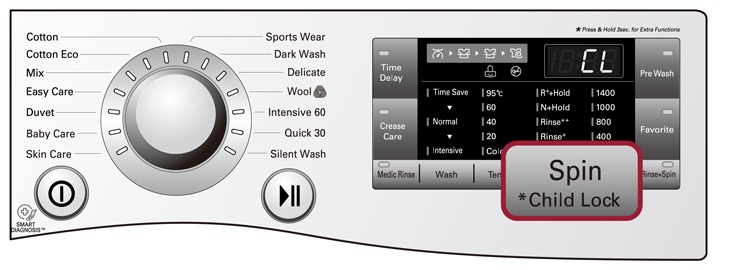
LG Washer Error Code CL: Truth First
LG washer error code CL is NOT a malfunction.
It simply means Child Lock is turned ON.
When CL appears, the washer is intentionally locking the control panel to prevent accidental button presses.
What CL Actually Stands For
CL = Child Lock
This feature:
Disables most buttons
Prevents cycle changes
Stops kids from opening or restarting the washer
The washer is working normally.
How People Usually Notice the CL Code
Instead of symptoms, here’s what users commonly experience:
Buttons don’t respond
Washer won’t start or change cycles
Display shows “CL” constantly
Power button may still work
This often makes users think the washer is broken, but it isn’t.
How to Turn Off LG Washer CL Code (Exact Method)
Standard Method (Works on most models)
Turn the washer ON
Press and hold the Child Lock button(s) for 3–5 seconds
On many LG models, Child Lock is activated by holding:
Temp + Spin
Spin + Soil
Or a button labeled Child Lock
Look for a lock icon on the control panel.
Once disabled, the CL code disappears immediately.
Why LG Washers Enable Child Lock Automatically
CL often turns on because of:
Accidental long button press
Kids touching the panel
Cleaning the control panel
Leaning against buttons
It can happen without you realizing it.
Common Myths About LG Washer CL Code
❌ Myth: CL means control board failure
✔ Reality: Control board is fine
❌ Myth: Washer needs repair
✔ Reality: No repair needed
❌ Myth: Washer is locked permanently
✔ Reality: CL is fully reversible
What CL Is NOT
To avoid confusion, CL does not mean:
Motor problem
Drain issue
Water supply issue
Electrical fault
It is purely a safety lock feature.
What If CL Won’t Turn Off?
If CL does not deactivate:
Unplug washer for 5 minutes
Plug it back in
Try disabling Child Lock again
If buttons still don’t respond, there may be a control panel button issue, which is rare.
When to Call for Service
You usually do not need service for CL.
Call support only if:
Buttons physically don’t work
Display is frozen even after reset
Washer won’t power on at all
For official help, contact LG support.
How to Prevent CL From Turning On Again
Avoid long-pressing random buttons
Wipe panel gently (don’t hold buttons while cleaning)
Teach kids not to touch the control panel
The LG washer error code CL is not an error at all.
It simply means Child Lock is active.
Once you know how to turn it off, it takes seconds, not repairs.
Read More:
LG washer error code OE meaning and how to fix it
LG washer UE error code meaning and how to fix