
LG Washer Error Code PE Meaning | Causes and Simple Fixes
LG washer error code PE means a water level or pressure sensor problem. Learn why it happens and how to fix the PE error step by step.
1/21/20262 min read
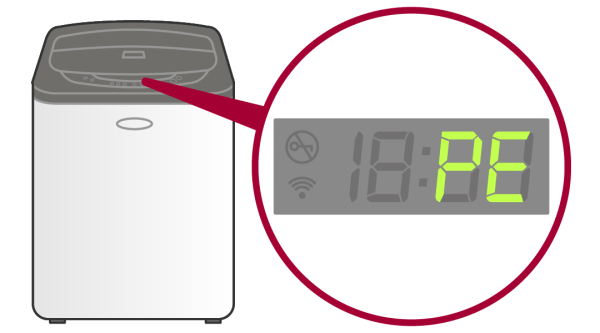
What Is LG Washer Error Code PE?
The LG washer error code PE stands for Pressure Error.
It means the washer is unable to correctly sense the water level inside the drum.
LG washing machines use a pressure switch (water level sensor) to decide when to stop filling water and start washing. When this sensor sends incorrect signals, the washer displays the PE error and stops operating to prevent overflow or dry running.
This error can occur in both LG front-load and LG top-load washers.
Common Causes of LG Washer PE Error
Below are the most common reasons why the PE error appears.
1. Faulty Water Level Sensor
A damaged or malfunctioning pressure switch cannot detect the correct water level.
2. Loose or Blocked Pressure Hose
The small hose connected to the pressure switch may be loose, kinked, or clogged with dirt or detergent residue.
3. Sudden Power Fluctuation
Voltage spikes or power cuts can confuse the washer’s control system and trigger the PE error.
4. Control Board Issue
If the main control board fails to interpret signals from the pressure sensor, the PE code may appear.
5. Incorrect Installation
Improper washer leveling or installation can affect water sensing and cause pressure-related errors.
How to Fix LG Washer Error Code PE
Try the following steps in order. Many PE errors can be fixed at home.
Step 1: Reset the Washer
Unplug the washer from the power outlet.
Wait 10 to 15 minutes.
Plug it back in and start a new wash cycle.
This resets the control board and clears temporary glitches.
Step 2: Check Water Supply
Make sure:
Water taps are fully open
Water pressure is normal
Inlet hoses are not bent or blocked
Low or inconsistent water supply can confuse the pressure sensor.
Step 3: Inspect the Pressure Hose
If you are comfortable opening the washer:
Check the thin rubber hose connected to the pressure switch
Ensure it is not loose, cracked, or clogged
Clean or reattach it if needed.
Step 4: Avoid Excess Detergent
Too much detergent creates excess foam, which can affect water level readings and trigger the PE error.
Use HE detergent only and follow the recommended quantity.
Step 5: Replace the Pressure Switch (Advanced)
If the PE error keeps returning, the pressure switch may need replacement.
At this point, it’s best to contact a trained technician.
Can You Use the Washer With PE Error?
No.
Running the washer with a PE error can lead to overfilling, draining issues, or incomplete wash cycles. Always resolve the issue before continued use.
When to Call for Service
Call a professional if:
PE error appears every cycle
Washer stops during water filling
Reset does not work
You suspect a control board issue
For genuine parts and service, contact LG authorized support.
How to Prevent LG Washer PE Error
Use correct detergent quantity
Ensure stable power supply
Keep washer properly leveled
Clean inlet filters regularly
Avoid DIY wiring changes
The LG washer error code PE is mainly related to the water level sensing system. In many cases, a simple reset or hose check fixes the issue. If the problem persists, replacing the pressure switch is usually the permanent solution.
Fixing the PE error early helps protect your washer from serious damage.
Read More:
LG washer error code OE meaning and how to fix it
LG washer UE error code meaning and how to fix