
Samsung Washer Error Code ND: A Troubleshooting Checklist
Use this step-by-step troubleshooting checklist to diagnose and fix Samsung washer error code ND, starting with the quickest solutions and moving to advanced checks only if needed.
1/19/20262 min read
First: What Does ND Mean?
ND means the washer is not draining water properly within the required time.
To prevent flooding or motor damage, the washer stops the cycle when drainage fails.
This error appears on washing machines made by Samsung.
Quick Fix Checklist (Start Here)
☐ 1. Pause the Washer
Stop the cycle as soon as the ND code appears.
☐ 2. Check for Standing Water
Is water still inside the drum?
Does the washer stop before spinning?
This confirms a drainage problem.
Drain System Checklist
☐ 3. Inspect the Drain Hose
Look for:
Kinks or bends
Crushed sections behind the washer
Hose pushed too far into the drain pipe
Fix: Straighten the hose and ensure proper installation height.
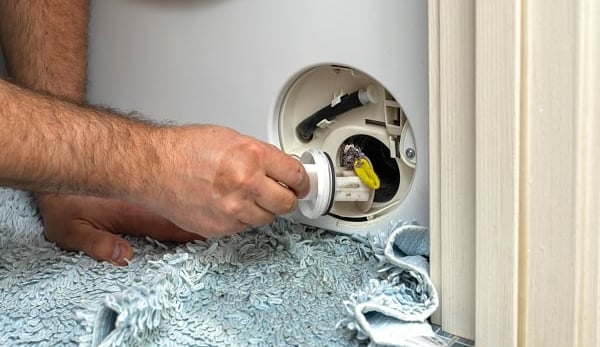
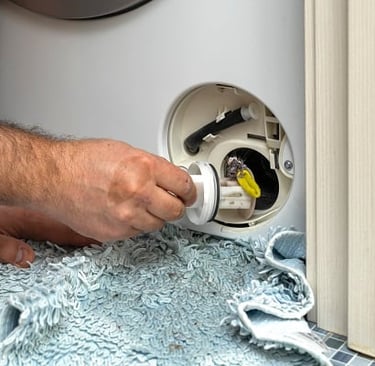
☐ 4. Clean the Drain Filter
This is the most common fix.
Steps:
Turn off and unplug the washer
Open the lower front access panel
Place a towel and shallow container underneath
Unscrew and remove the drain filter
Remove lint, coins, or debris
Rinse the filter and reinstall
☐ 5. Check the Drain Pump Area
While the filter is out:
Look inside for small objects
Ensure the pump impeller moves freely
Blockages here will trigger the ND error.
Restart Checklist
☐ 6. Reset the Washer
Plug the washer back in
Run a spin-only or drain cycle
If water drains properly, the issue is resolved.
If ND Error Keeps Coming Back
Proceed only if the steps above fail.
☐ 7. Drain Pump Failure (Advanced)
Signs include:
Humming sound with no draining
No sound at all from the pump
This usually requires pump replacement.
☐ 8. Control Board or Wiring Issue (Rare)
If the pump is functional but not receiving power, a wiring or board issue may exist.
Professional service is recommended.
When to Call a Technician
Call for service if:
The washer will not drain at all
ND error appears repeatedly
You smell burning or hear loud electrical noises
Prevention Checklist (Save This)
☐ Clean the drain filter every 1–2 months
☐ Check pockets before washing
☐ Avoid overloading the washer
☐ Ensure the drain hose is installed correctly
One-Page Summary
Error Code: ND
Problem: Washer not draining
Most common cause: Clogged drain filter
Fix difficulty: Easy to moderate
DIY friendly: Yes
Samsung washer error code ND is usually caused by simple blockages and can often be fixed at home in minutes. Regular filter cleaning prevents most drainage issues.
Read More: